
Adam Reed

You find a promising backend role. Then comes the admin: checking the company, comparing the requirements with your experience, finding the right resume, filling out another form, and remembering when to follow up.
AI agents can help with much of that work. They can research companies, organize roles, update a tracker, prepare interview notes, and draft emails. Keep the application review and final submission with you. The employer receives those answers as your account of your experience and intentions.
Here is a useful rule for a developer’s job search: delegate the preparation; own the submission.
What Can You Delegate to an AI Agent?
Task | Ask the agent to produce | Keep this decision |
|---|---|---|
Find suitable roles | A shortlist with source links and missing details | Which roles are worth pursuing |
Track applications | Status updates tied to emails or confirmations | Whether the evidence supports the update |
Prepare for interviews | Questions and examples drawn from your real work | What you can explain and defend |
Follow up | A draft based on the last conversation | The recipient, wording, and decision to send |
Complete an application | Materials and suggested field values for review | Every answer, attachment, and final submission |
If your tracker, documents, and email live in different tools, Aident Loadout gives compatible agents access to connected Apps and Skills. That lets you bring the tools you already use into the workflow. Start with a small task, such as reading selected recruiter messages and proposing tracker updates, then inspect the result before allowing changes.
The examples below are suggested instructions you can adapt, not results from a tested job-search automation.
1. Build a Shortlist You Can Actually Evaluate
“Find me a good developer job” leaves too much for an agent to guess. Give it constraints that change your decision: location, time-zone overlap, seniority, compensation, preferred stack, and whether sponsorship is needed.
For example:
Find five backend engineering roles that match these preferences: remote within the US, Python or Go, and a team working on developer tools. For each role, include the employer’s posting, location restrictions, stated compensation, relevant requirements, and unanswered questions. Label anything the posting does not state as unknown. Do not contact anyone or apply.
Ask for evidence beside each recommendation. “Uses Go” should link to the posting or another first-party source. “Good engineering culture” needs a more specific explanation before it belongs in your decision.
A useful shortlist makes gaps visible. If a role’s location policy or salary is unclear, put that in a question column. A neat table should not make uncertain information look settled.
2. Make the Tracker Remember What Happened
Your tracker should answer three questions: Where did I apply? What happened last? What should I do next?
Start with company, role URL, application date, confirmed stage, last contact, next action, and the resume version used. An agent can compare those records with selected emails and calendar entries, then propose updates.
Suppose a recruiter writes, “Could you send two times for a technical interview?” The useful update is “Scheduling technical interview,” with a reminder to reply. It is too early to mark the interview as booked. Likewise, a week without a response is still a week without a response; it does not establish a rejection.
Have the agent show the supporting message beside each proposed change. You can review a short list of updates much faster than reconstructing an entire search from your inbox.
3. Prepare Interview Examples You Can Defend
Give the agent the job description, your resume, and notes about projects you can discuss. Ask it to map each important requirement to one real example from your work, then identify the gaps.
For a backend role, that might mean a project involving database migrations, a production incident, or a performance improvement. Follow up with:
Ask me five questions an interviewer might use to test this example. Focus on my contribution, the trade-offs, what went wrong, and how we measured the result. If my notes lack evidence, ask me for it.
An agent can help you explain a migration more clearly. It cannot turn “contributed to the migration” into “led the migration” or invent a latency improvement. You should be able to explain every sentence in the interview.
Use the same approach for company research: a short brief, sources, and questions you still want to ask the team. That gives you material for a conversation without handing you a script to recite.
4. Draft Follow-Ups From the Actual Conversation
A useful follow-up refers to something specific. Give the agent the last exchange, the role, and what you want to ask next.
For example: “Draft a reply under 100 words. Thank the interviewer for discussing the team’s migration project, mention the relevant example we covered, and ask about the next step. Use only details in these notes.”
Read the message before sending. Check the name, role, facts, and tone. A polished email that refers to the wrong interview creates more work than it saves.
Where Agents Should Stop: Reviewing and Submitting the Application
An application form can look like data entry while asking you to make real commitments. Work authorization, location, compensation expectations, and statements about your experience need your answers. You also need to know which resume and cover letter the employer will receive.
That is why the final application should stay visible to you. Let software reduce the typing. Review the filled form and submit it yourself.
JobWizard supports this part of the workflow. It is a standalone Chrome extension that you operate on the employer’s application page. It compares your selected resume with the active job description, helps tailor your resume and cover letter, fills application fields, and tracks submissions.
Compare the Role With Your Resume
Use the match guidance to see where your experience needs a clearer explanation. Review any tailored wording against what you actually did.
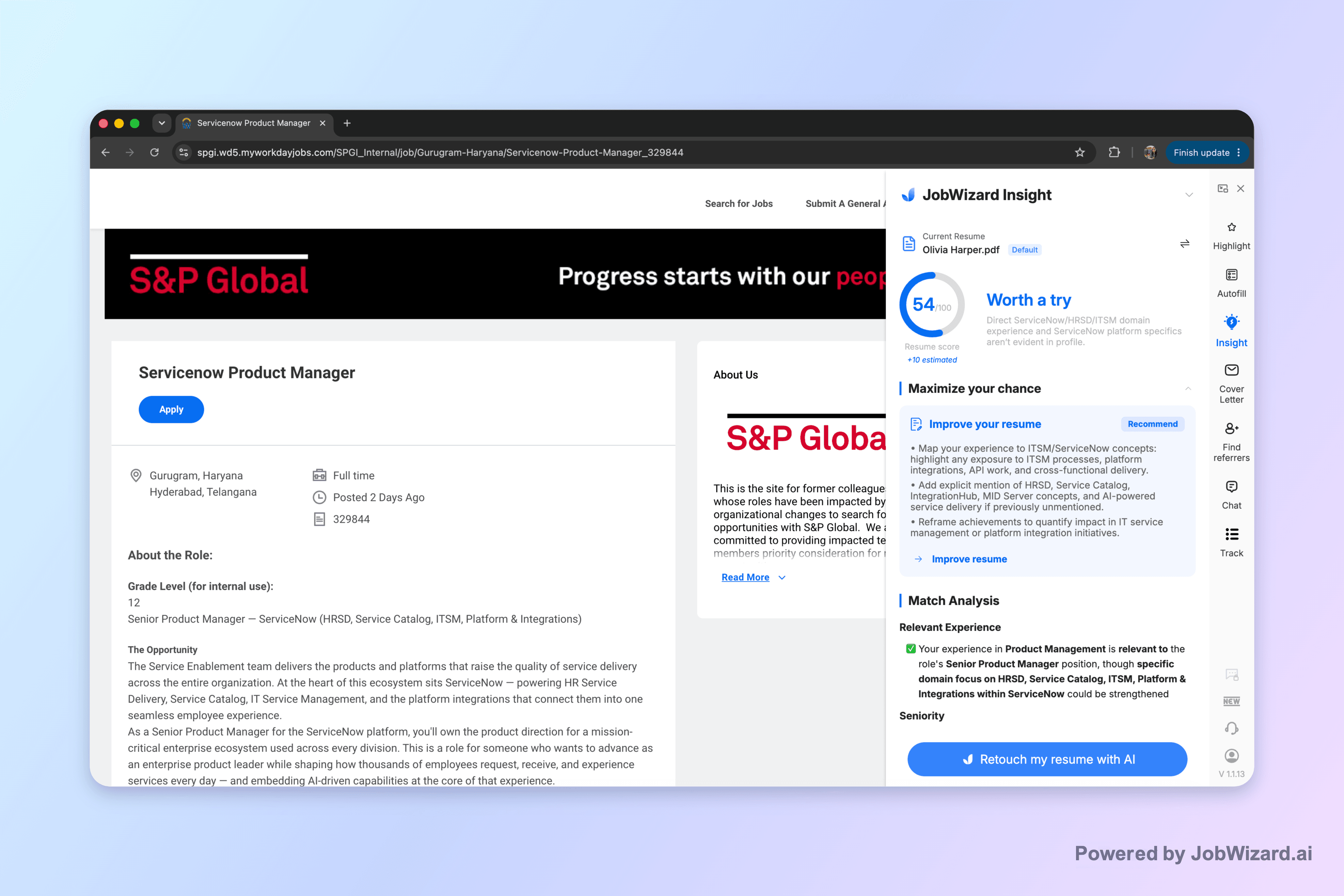
JobWizard compares the active job description with the selected resume and highlights areas that may need attention.
Fill the Form, Then Check Every Field
JobWizard can autofill repetitive fields on platforms including Workday, Greenhouse, Lever, Ashby, iCIMS, and SmartRecruiters. You review the completed fields and press submit yourself.
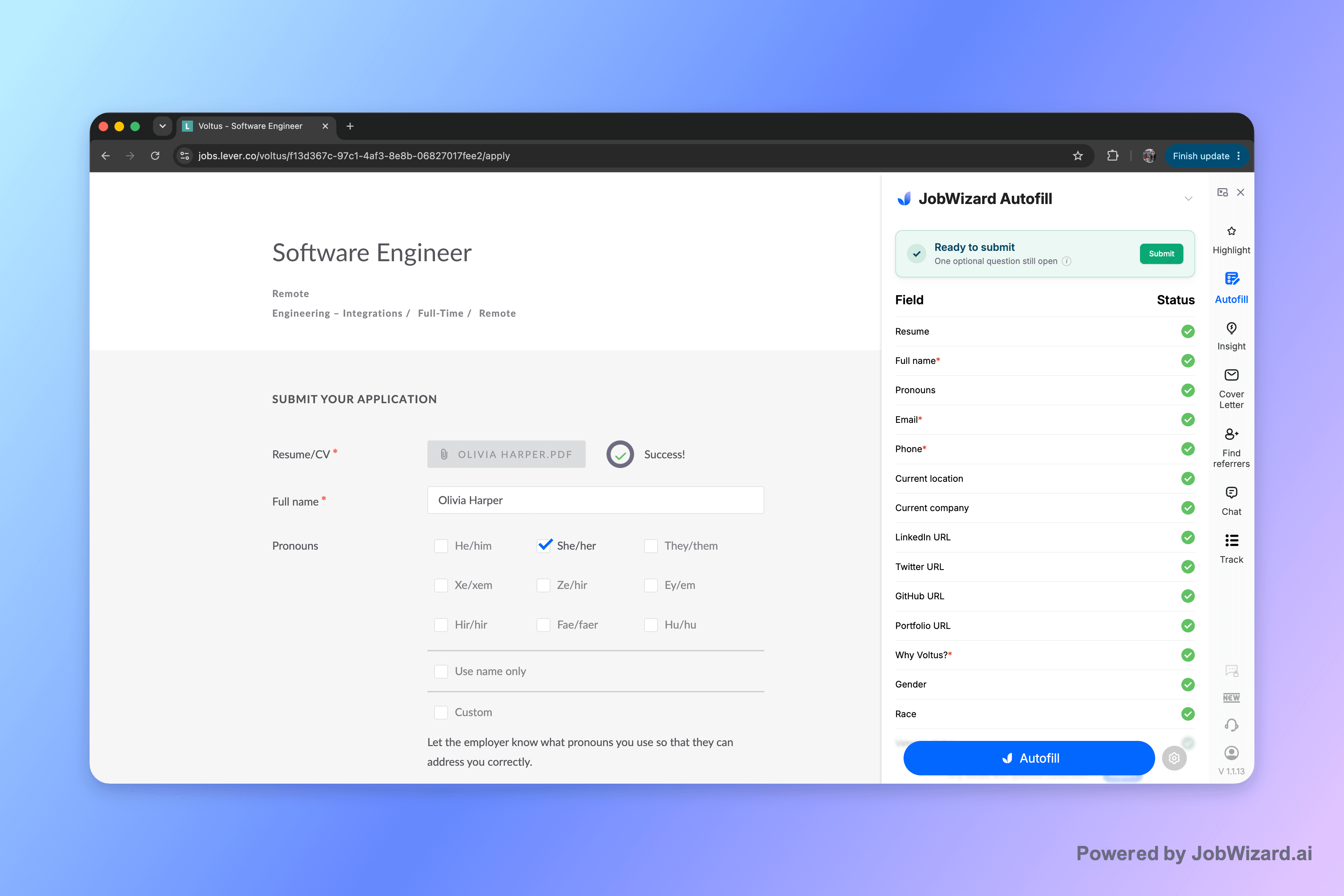
JobWizard fills repetitive application fields while leaving the final review and submission with the job seeker.
Keep a Record After Submitting
The application record helps you keep track of the role and the support used to prepare it.
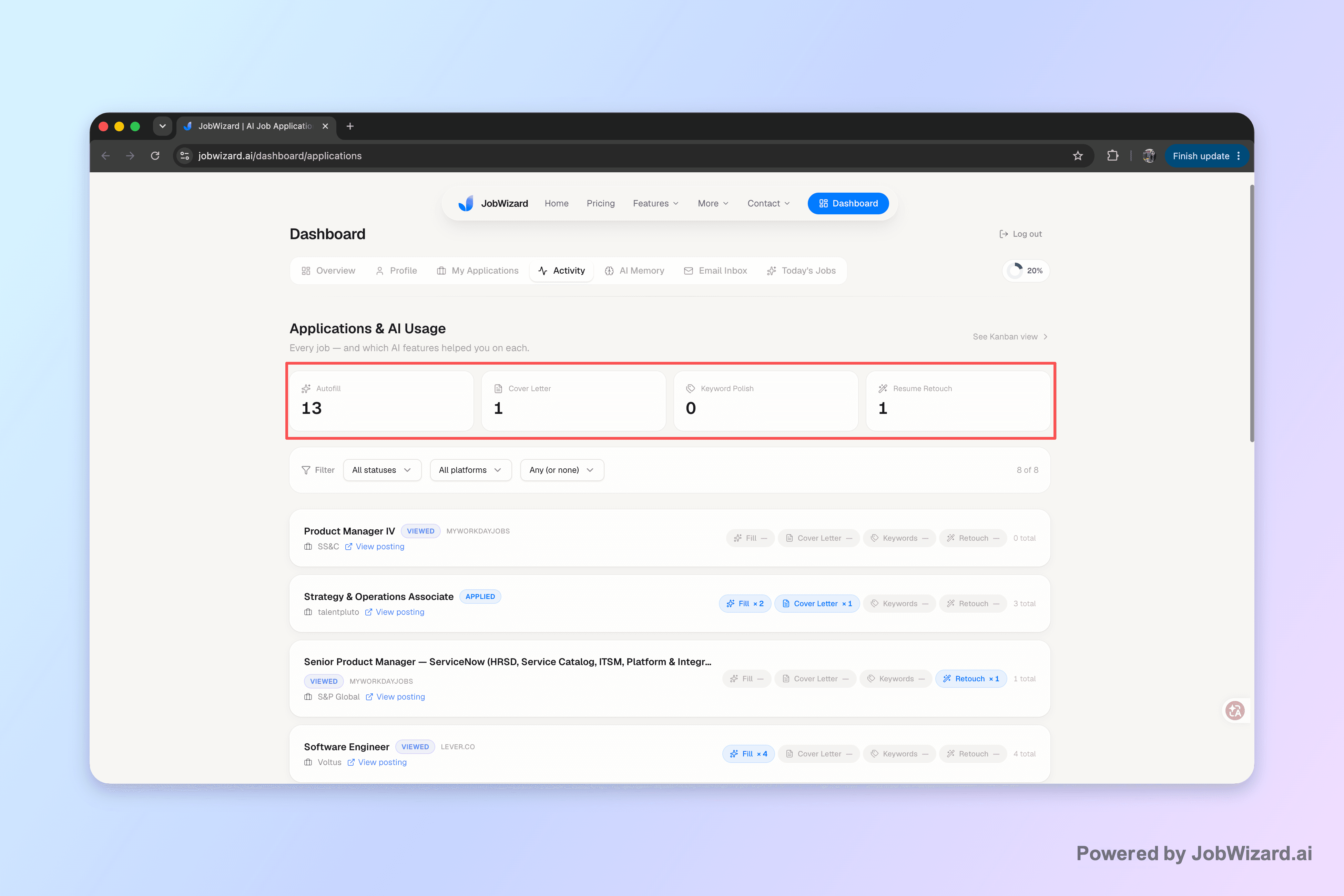
The JobWizard dashboard keeps a record of applications and the support used for each role.
JobWizard’s role runs from a relevant job description to a reviewed submission. It does not source jobs or handle interviews and offers. It is independent of Aident Loadout, not an Aident App, Skill, or integration, and it does not submit applications without you.
Start With One Role
Try the workflow on a single posting. Have an agent prepare a sourced brief, map the requirements to your experience, and draft a tracker entry. Read those outputs before expanding the task. Then use JobWizard on the application page, review the materials and fields, and submit when you are satisfied.
If you want your agent to work with connected tools, start with how to use Aident Loadout. To set it up, tell your coding agent: Follow https://aident.ai/SETUP.md.
Keep credentials out of chat using the approach in giving agents API access without exposing keys, and choose which actions need approval before allowing the agent to change records or send messages.
The useful outcome is a search you can follow: why you chose a role, what you told the employer, and what happens next.
Sources
Product details were checked on September 15, 2026. Recheck the workflow if application submission behavior or connected-tool permissions change.
About the author

Adam Reed
Adam Reed graduated from the University of Florida in business and has more than five years of experience as a technical program manager at startups and large technology companies. An experienced operator, he covers business operations, project management, and practical automation at Aident.







The one tool
for every tool
your agent needs.
Give any AI agent real capabilities in seconds. Connect 27,000+ tools once, skip the setup headache, and let your agents execute.